mdworks / PostFinder
PostFinder
Describe the post you remember in plain words. PostFinder turns it into the exact x.com advanced search, so you never have to learn the operators.
Open PostFinder →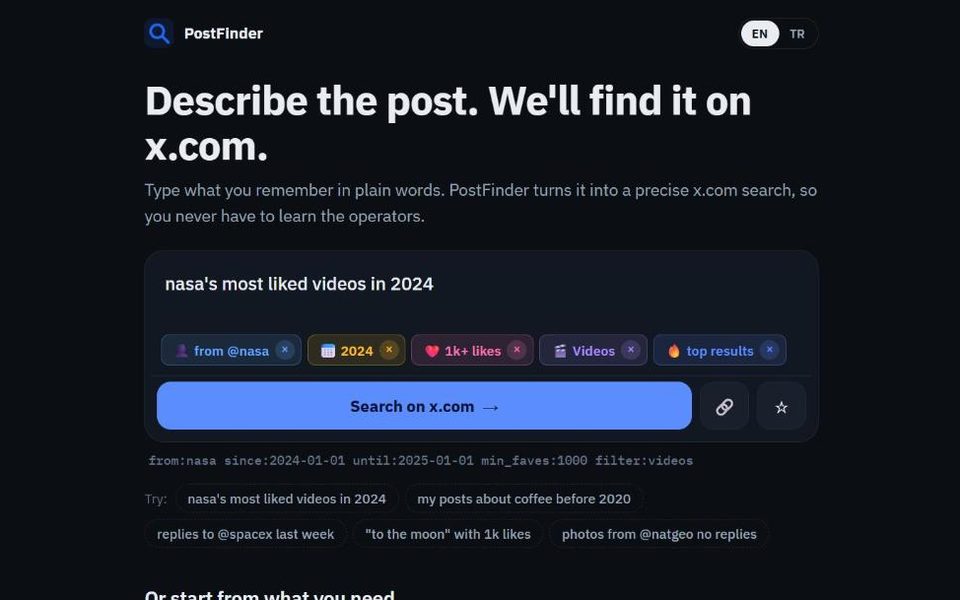
- plain wordsin English or Turkish
- 15+search filters
- 51countries' trends
- 0accounts needed
How it works
Type what you remember the way you would tell a friend: who posted it, roughly when, what it was about, whether it was popular or had a video. PostFinder picks out those details and shows each one as a coloured tag you can remove. The search it builds opens on x.com.
For example, nasa's most liked videos in 2024 becomes from:nasa filter:videos since:2024-01-01 until:2025-01-01, sorted by top results.
What it understands
- Who: posts from an account, replies to an account, posts mentioning someone, or your own posts.
- When: a year, a month, "last week", "yesterday", "before 2020" or exact dates.
- How popular: "with 1k likes", "10k reposts".
- What kind: photos, videos, links, replies only or no replies.
- Words: an exact quote in quotation marks, words to include or exclude, hashtags.
- Language: "in Portuguese", "türkçe" and more than twenty other languages.
Trending now
Under the search box PostFinder shows what people in your country are searching for right now, taken from Google Trends' public trend lists for 51 countries and refreshed every half hour. Tap a topic to see today's newest posts about it in the local language. You can switch to any other country's trends from the list.
Saved and recent searches
Searches you save or open stay in your browser only, so you can come back to them. Nothing is stored on our side.
PostFinder is an independent tool and is not affiliated with X Corp.
Questions
Do I need an x.com account?
PostFinder itself needs none. x.com may ask you to log in to see search results.
Why do I see fewer results than expected?
x.com's search does not index every post forever, especially replies and posts from protected accounts. Loosening one filter, such as the date or the like count, often helps.
How does PostFinder know my country for trends?
The page asks our server which country the request comes from, as every website can see. It is used only to pick the trend list and is not stored.